
New sales and licenses for kawaChord2 are currently discontinued while a next-generation version is being planned and developed.
We sincerely thank all our users for their continued support over the years. Future updates will be announced here on our website.
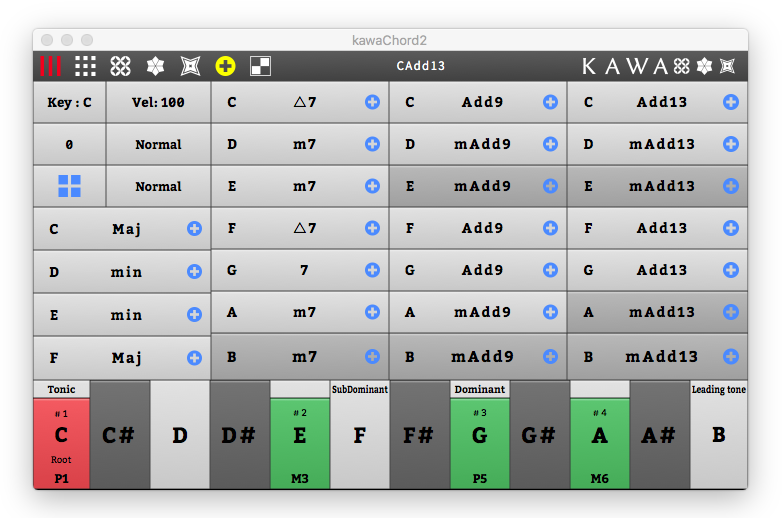

This product is handy for quickly entering chord tones (MIDI notes) without the knowledge of every chord tones of each chord.
# Functions:
- 4 Simple Mode (Default Mode, Circle Of Fifth Mode, Chord Analysis Mode I and II).
- MIDI notes are sent as chord tones by pressing a chord name button.
- Diatonic chords are highlighted based on the main key and chords' root you set.
- Place chords to DAW as MIDI Clip Item.
(As of today, this function has been confirmed with the following Host applications: Studio One, Reaper and Bitwig Studio). - The Step Sequencer of Chord tones (version 2.05~ )
- Chord progression mode (in Advanced Mode) (version 2.10~ )
- Search chords mode from musical scale. (in Advanced Mode) (version 2.10~ )
# Examples Uses:
- Quick play and check chords tones.
- You can also use it for a rough sketch of chord progressions.
- Useful when writing chord progressions according to tonality.
# Requirements:
- 40 MB free hard disk space
- Windows 10 newer, 32bit 64bit processor with 2 GB RAM
- MacOSX 10.9 (recommend newer OS)
- Display capable of 1024×768
- VST, VST3 host program, AU (Logic ProX)
- ASIO supporting sound card (recommended)
# Notes:
- Downloads Manual : 日本語
- Downloads Manual : English
- v2.05 Additional Manual : 日本語
- v2.05 Additional Manual : English
- v2.10 Additional Manual : 日本語
- v2.10 Additional Manual : English
- Price: $50.00 - On the free version, only Triad chords are available.
# Latest version:
- Windows : 2.175 (2018/1/26)
- Mac OS X : 2.175 (2018/1/26)
- Change log is here.


version 2.15


version 2.05
■ kawaChord2 on Studio One (with modifier key)

■ Highlight Diatonic Chords

■ Step Sequencer (v2.05 ~)

■ Main Root key Changed

■ kawaChord2 on BitWig Studio (with modifier key)

■ kawaChord2 With MaiTai

■ Chord Root Changed
■ Chord Tone Analysis Mode

■ kawaChord2 on Reaper 5 (with modifier key)

prototype version. at 2015 ~ 2016

at 2016. prototype version.
